You know what’s always fascinated me about building communication systems? It’s not just making messages go from point A to point B—that’s the easy part. The really interesting challenge is making sure those messages actually get there even when the recipient isn’t around to receive them. That’s the kind of problem that keeps engineers up at night, and it’s exactly what MeshCore Room Servers solve in an elegant, practical way.
The Problem Space: Why We Need Something Better
Let me paint you a picture. You’re out hiking, or you’re coordinating an emergency response, or maybe you’re just trying to stay connected in an area where cellular infrastructure decided not to exist. You’ve got your LoRa mesh network humming along nicely, messages bouncing through repeaters, everything seems great. But here’s the catch: if someone’s device is turned off, out of range, or they’ve just stepped into a valley at the wrong moment, they miss messages completely. Gone. Never to be seen again.
Traditional mesh networks—and I’m thinking specifically about how other systems handle this—treat every message like a live conversation. Either you’re there to catch it when it flies by, or you’re not. It’s like trying to have a conversation by shouting across a canyon—works great if everyone’s listening right at that moment, but terrible for asynchronous communication.
That’s not how humans naturally communicate, and frankly, it’s not how resilient communication systems should work either.
What Room Servers Actually Do (And Why It’s Brilliant)
Here’s where MeshCore Room Servers come in, and I have to say, this is one of those ideas that makes you think “why didn’t we have this from the start?”
A Room Server is essentially a bulletin board system sitting in your mesh network. Think of it as a post office that holds your mail until you come pick it up. When you send a message to a Room Server, it doesn’t just relay it once and forget about it. It stores that message, time-stamps it, keeps it safe. Then, when someone who was offline comes back online and logs into the room server, they get pushed all the messages they missed—up to the last 16 unseen messages.
This is store-and-forward messaging, and it transforms how you can use a mesh network. Suddenly you’re not limited to synchronous, real-time communication. You can leave messages for people. They can check in hours later and catch up on everything that happened. It’s like email, but running on LoRa radios without any internet infrastructure.
Using Room Servers as a Client
While much of this article has focused on setting up and hosting room servers, let’s talk about the experience from the other side—actually using a room server as a client. This is what most users will encounter, and it’s refreshingly straightforward.
Discovering Available Room Servers
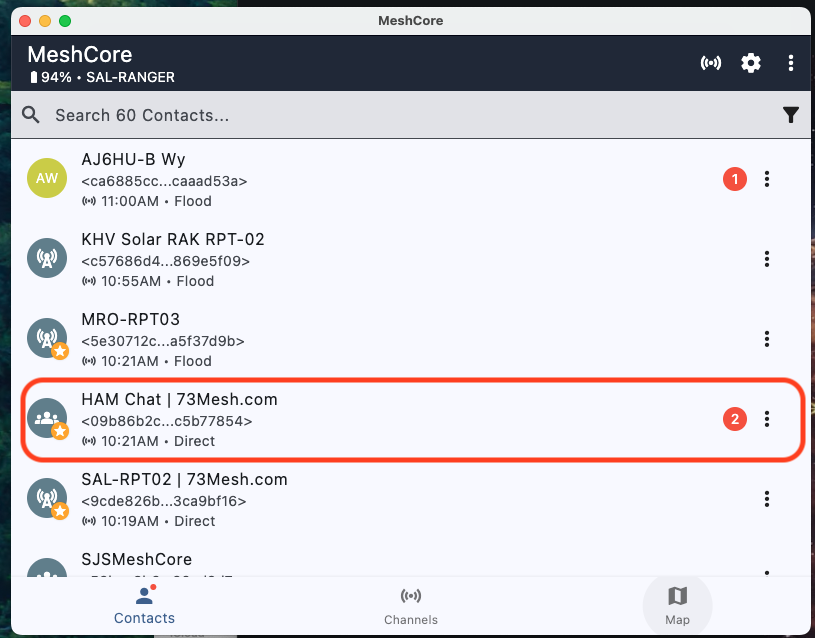 When a room server is active and advertising on your mesh network, it appears in your MeshCore contacts list just like any other node. The key difference? Room servers typically identify themselves with descriptive names that indicate their purpose.
In the screenshot above, you can see several nodes in the contacts list, including “HAM Chat | 73Mesh.com”—a room server that’s been set up specifically for amateur radio operators to exchange messages. Notice how it shows up with a distinct icon and indicates it’s a “Direct” connection type. Other room servers like “SAL-RPT02 | 73Mesh.com” might serve different purposes or communities.
The beauty of this system is discoverability. You don’t need to know IP addresses or configure connection strings. If a room server is within range (directly or through repeaters), it shows up in your contacts automatically.
Connecting to a Room Server
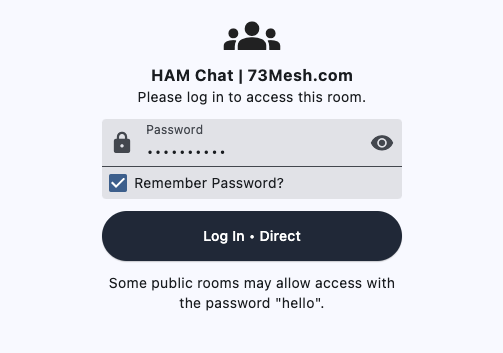 When you tap on a room server from your contacts list, you’re presented with a login screen:
This is where the three-tier permission system comes into play. Depending on how the room server is configured:
- Guest Access: Enter the guest password (which the room server administrator will share with users). This gives you the ability to post messages and retrieve your missed messages.
- Public Read Access: Some room servers allow access with a blank password or the default “hello” password, letting you read messages without authentication.
- Admin Access: For server administrators only—don’t try to guess this one!
The “Remember Password” checkbox is handy if you’re frequently connecting to the same room server. Your MeshCore client will store the credentials and log you in automatically next time.
The Chat Experience
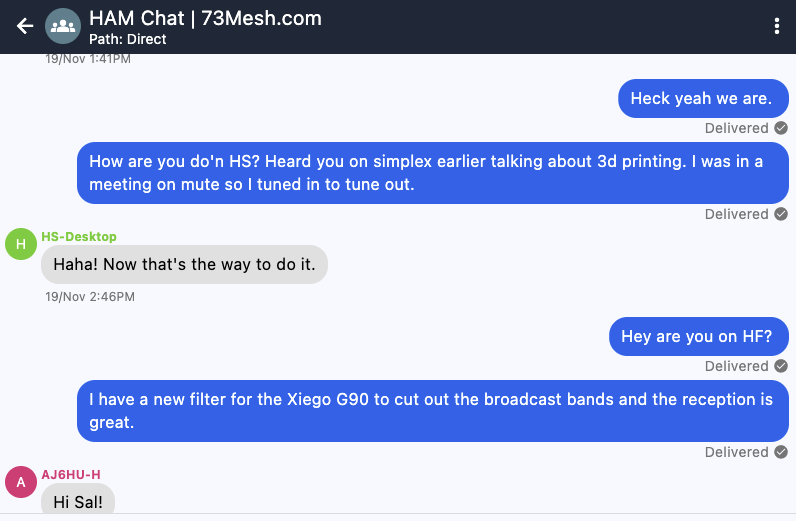 Once logged in, the room server interface looks just like any other chat in MeshCore:
In this example, you can see an actual conversation happening on the “HAM Chat | 73Mesh.com” room server. Users are discussing ham radio topics—someone mentions 3D printing and HF operations, another user talks about a filter for the Xiego G90 radio.
Notice the “Delivered” checkmarks on the messages? That’s MeshCore’s definite acknowledgment system at work. You know your messages made it to the room server successfully.
What Happens When You’re Offline
Here’s where the magic really happens. Let’s say you:
- Log into a room server and catch up on messages
- Turn off your radio and go hiking for three hours
- During that time, other users post several messages to the room server
- You turn your radio back on and log into the room server again
The room server automatically pushes you the last 16 messages you missed. You’re not stuck wondering “what did I miss?”—it’s all there, time-stamped and waiting for you. This is the store-and-forward capability that makes room servers so valuable for real-world communication scenarios.
Multiple Room Servers
Your MeshCore device can connect to multiple room servers. Think of it like being a member of different Discord servers or Slack workspaces. You might have:
- A general community room server for casual chat
- An emergency preparedness room server for ARES/RACES coordination
- An event-specific room server for a special activity
- A club-specific room server for your local amateur radio club
Each appears in your contacts list, each has its own authentication, and each maintains its own message history independent of the others.
Best Practices for Room Server Users
Password Management: If you’re given guest access to a room server, treat that password with appropriate care. It’s not launching missiles, but it does control who can post messages to the community.
Be Patient with Acknowledgments: In a mesh network, especially one with multiple hops between you and the room server, messages can take several seconds to fully traverse the network. Wait for the “Delivered” indicator before assuming something went wrong.
Check In Regularly: While room servers store messages for you, they’re not infinite storage systems. The 16-message buffer means if you’re away too long and the conversation is very active, you might miss older messages. Check in periodically if you need to stay current.
Respect the Community: Room servers often serve specific purposes or communities. Read the room (pun intended) and make sure your messages are appropriate for the context. A room server set up for emergency coordination isn’t the place for gear reviews.
The Three-Tier Permission System
What really shows the engineering thoughtfulness here is the permission model. Room Servers implement three distinct access levels:
-
Admin Access - Full control with password authentication (default: “password”, which you should definitely change). Admins can post messages, retrieve history, and configure the server remotely via command-line interface.
-
Guest Access - Password-protected (default: “hello”) allowing users to post messages to the room and retrieve their missed messages. This is your standard user level.
-
Read-Only Access - You can enable blank password access that lets anyone read messages but not post. Perfect for public bulletin boards or information dissemination.
This isn’t just security theater—it’s genuinely useful access control that lets you run everything from private team communication to public information boards on the same infrastructure.
Setting Up Your Own Room Server
Now let’s talk about actually deploying one of these, because that’s where the rubber meets the road.
Hardware Requirements
Room Server firmware runs on the same devices that run MeshCore client and repeater firmware. We’re talking about:
- Heltec V3/V4 boards
- LilyGo T-Deck/T-Echo
- RAK Wireless modules
- Seeed Studio C3 boards
You don’t need anything exotic. These are the same radios you’d use for client devices, which means you can repurpose hardware as your network needs evolve. I love that kind of flexibility.
The Flashing Process
The MeshCore Flasher tool makes this almost ridiculously easy:
-
Navigate to the Flasher: Point your browser to
flasher.meshcore.co.uk—it’s web-based, which means it works on any platform with Chrome or a Chromium-based browser. -
Select Your Device: The flasher auto-detects your hardware when you plug it in via USB. Choose “Room Server” from the firmware options.
-
Flash the Firmware: One click. Seriously. The flasher handles all the complicated bits—writing the firmware image, setting up the file system, initializing the radio parameters.
-
Initial Configuration: Once flashing completes, you can either:
- Connect via USB to the web config tool at
config.meshcore.dev - Use a node with the MeshCore app for remote configuration over LoRa (if you’ve unlocked the remote management features)
- Connect via serial terminal to access the command-line interface directly
- Connect via USB to the web config tool at
Essential Configuration Steps
Here’s what you need to configure to get a production-ready room server:
# First, secure your system - change the default passwords!
set admin_password YourSecurePasswordHere
set guest_password YourGuestPasswordHere

# Enable or disable read-only access for unauthenticated users
set allow_blank_password on  # or 'off' for private servers

# Set your advertising interval (how often the server announces itself)
# Value is in hours - I recommend 4 hours for good balance
set flood_advert_interval 4

# Configure your time settings (critical for proper operation)
time 1738242833  # Set current epoch time in seconds

# Set your location for the MeshCore map (optional but helpful)
set advert_lat 37.3352
set advert_long -121.8811
set advert_name "Valley Room Server"

# Radio parameters - use regional presets for best results
# Example for USA/Canada (915 MHz band)
set freq 910.525
Radio Configuration Deep Dive
This is where things get technically interesting. MeshCore has moved toward narrower bandwidth settings for very good reasons:
The current recommended settings for most regions use BW 62.5 kHz with SF7-9 (spreading factor). This might seem counterintuitive—narrower bandwidth typically means shorter range, right? But here’s the engineering trade-off: in the crowded ISM bands, narrower signals slip between interference sources. You get:
- Lower noise floor
- Better signal-to-noise ratio (SNR)
- Faster transmission times (lower SF helps here too)
- Less chance of collision with other signals
For US/Canada, that’s 910.525 MHz, SF7, BW62.5, CR5 (coding rate 4/5). For UK/EU on the 868 MHz band, similar principles apply. The MeshCore flasher provides regional presets—use them. The community has done extensive field testing to arrive at these parameters.
Optional: Enabling Repeater Function
Room Servers can technically also function as repeaters with the command:
set repeat on
But here’s my engineering recommendation: don’t do this unless you absolutely have to. A room server performing double-duty as a repeater lacks the full suite of repeater management features that dedicated repeater firmware provides. If you need both functions, use two devices. The hardware is inexpensive enough that the operational clarity is worth it.
Remote Management
One of the coolest features: if you’ve got a node running registered MeshCore firmware, you can administer room servers entirely over LoRa. No USB connection needed. You can check logs, change settings, view connected clients—all through the radio link. For servers mounted in remote locations (like hilltops or tall buildings), this is an absolute game-changer.
What Makes This Different from Meshtastic
Okay, let’s address the elephant in the room. Many folks are familiar with Meshtastic, and they’re wondering: why should I care about MeshCore Room Servers?
The differences run deeper than just “this protocol does things that protocol doesn’t.” It’s about fundamental architectural decisions that affect how your network behaves.
Store-and-Forward vs. Fire-and-Forget
Meshtastic operates purely in real-time. When you send a message, it propagates through the mesh. If the recipient is online and in range (directly or through hops), they get it. If not, it’s gone forever. There’s no message persistence, no retrieval mechanism, no “check your messages later” capability.
MeshCore Room Servers decouple message transmission from delivery. Messages persist until retrieved. You can be completely out of range, turn your radio back on three hours later, log into the room server, and get everything you missed. This is the difference between a walkie-talkie and email. Both have their place, but for many real-world scenarios, store-and-forward is what you actually need.
Routing Philosophy: Controlled vs. Chaos
This is subtle but important. In Meshtastic, every client device can repeat messages. It’s a true flood mesh—messages propagate through multiple paths simultaneously. This provides excellent resilience; even if several nodes fail, messages find alternative routes. The downside? Massive network traffic. Every device receives and potentially re-transmits multiple copies of the same message. Deduplication algorithms try to manage this, but you’re fighting against the basic architecture.
MeshCore takes a hybrid approach. Client devices (what they call “Companion” nodes) never repeat traffic. Only dedicated repeaters forward messages. This means:
- Far less network congestion
- Lower power consumption on client devices (not constantly re-transmitting)
- More deterministic network behavior
- Easier troubleshooting (you know exactly which repeaters are in the path)
The trade-off is you need to strategically place repeater nodes. But honestly? That’s good network engineering anyway. You want to know where your infrastructure is.
Definite Message Acknowledgment
Here’s another key difference: MeshCore provides definite ACKs (acknowledgments). When you send a message, you get a clear “yes, it was delivered” or “no, it failed” response. With Meshtastic’s flood approach, you’re never quite sure if the message got through all the hops to reach the final destination. You might see it leave your device, but did it actually arrive?
For emergency communications, for coordinating activities, for any scenario where reliability matters, definite acknowledgment isn’t just nice to have—it’s essential.
Network Traffic and Efficiency
Let’s talk numbers and real-world performance. Because MeshCore clients don’t repeat, and because the routing protocol is more deterministic, you see dramatically lower “time on air” per message. This matters for several reasons:
- Regulatory compliance: ISM bands have duty cycle limits in many regions. Lower transmit time means more headroom.
- Battery life: Less transmission equals longer battery life on portable devices.
- Network capacity: With less traffic, more simultaneous users can coexist on the same frequency.
There’s an elegance to the engineering here. By being more selective about what gets transmitted and by whom, the whole system becomes more efficient.
The Authentication Model
MeshCore uses password-based authentication for room servers and remote management. Meshtastic relies more on encryption keys and channel configurations. Neither approach is inherently “better”—they serve different use cases.
Passwords make it easy to grant temporary access (“here’s the guest password for today’s event”). Key-based systems make it harder for unauthorized users to even see that traffic exists. If you’re running a private mesh for a specific group, MeshCore’s password approach is often more manageable. If you’re worried about traffic analysis, encryption-only approaches have advantages.
Real-World Use Cases
Let me sketch out some scenarios where Room Servers really shine:
Emergency Communications Networks
Imagine a disaster response scenario. Your team is spread across a region with no cellular coverage. People are moving in and out of radio range constantly. With room servers strategically positioned (maybe on emergency services vehicles or at command posts), team members can:
- Check in when they get to a location
- Retrieve status updates they missed while in transit
- Leave detailed reports without needing the recipient to be online right then
- Coordinate logistics asynchronously
This isn’t theoretical—this is exactly the kind of resilient communication infrastructure we need when traditional systems fail.
Search and Rescue Operations
SAR teams often work in shifts, with members rotating in and out of the field. A room server becomes the information hub:
- Outgoing teams check the latest search grid updates before heading out
- Incoming teams leave field reports as they return
- Coordination happens naturally even though not everyone is online simultaneously
- Message history provides a chronological log of the operation
Scout Events and JOTA
For those of us involved in Scouting, Jamboree-on-the-Air events can deploy room servers as learning tools. Scouts learn about:
- Store-and-forward messaging (understanding how early email systems worked)
- Network infrastructure (repeaters vs. servers vs. clients)
- Emergency communications principles
- Authentication and access control
Plus, it’s just plain cool for kids to see their messages persisting on a server they can’t physically touch, transmitted only by radio waves.
Rural Property Management
If you’ve got a large property, farm, or ranch, room servers let you set up a private communication network without monthly fees or reliance on distant cell towers. Leave messages for staff, get updates on equipment status, coordinate activities—all without internet connectivity.
Technical Considerations and Best Practices
Time Synchronization
This is critical: room servers need accurate time. Messages are timestamped, advertisements are scheduled, synchronization depends on it. Best practices:
- Set the time accurately when you first configure the server
- If possible, periodically sync from a GPS module
- For permanent installations, a small battery backup keeps the clock running through power cycles
Placement and Antenna Design
Since room servers need to be accessible to multiple users, placement matters:
- Height is your friend: Even a 20-foot elevation advantage dramatically improves range
- Line of sight: LoRa does penetrate obstacles, but not magically. Clear lines of sight to user areas maximize reliability
- Power: Permanent installations should use continuous power, not battery. You’re acting as infrastructure—be reliable
- Antenna: A quality antenna at the right frequency makes an enormous difference. This isn’t the place to cheap out
Network Topology Planning
Think about your room server as a hub in a hub-and-spoke topology. You might have multiple room servers for different purposes:
- One for general chat (open guest access)
- One for operations (restricted admin access)
- One for specific events (temporary guest password that changes)
With multiple room servers, users can choose which ones to log into based on their needs.
Security and Privacy
Change those default passwords. Seriously. “password” and “hello” are fine for testing, but in production:
- Use strong, unique admin passwords
- Rotate guest passwords periodically if needed
- Consider disabling blank password access unless you specifically want a public board
- Remember that LoRa transmissions can be received by anyone in range with the right equipment—physical layer security isn’t strong, so password protection is your primary defense
Monitoring and Maintenance
Room servers should be monitored for:
- Uptime (is the device still responding?)
- Storage usage (messages are stored on-device—monitor the filesystem)
- Client connection patterns (unusual activity might indicate problems or attacks)
- Radio parameters (interference conditions change; you might need to adjust)
If you’ve got remote management via node, periodic check-ins are straightforward. For remote installations without easy access, proper initial configuration becomes even more critical.
The Community and Ecosystem
I want to touch on something that’s both a challenge and an opportunity. MeshCore is newer than Meshtastic, which means the community is smaller. This creates a network effect problem—mesh networks are more valuable when more people use them.
But here’s the thing: sometimes the better technical solution needs time to gain adoption. And MeshCore’s approach to routing, acknowledgment, and store-and-forward messaging solves real problems that matter in production deployments.
If you’re building out mesh infrastructure for anything beyond casual experimentation—emergency comms, organizational networks, off-grid communities—MeshCore’s architecture provides the reliability and features you need. Room servers, in particular, transform the mesh from a toy into a legitimate communication system.
Looking Forward
The roadmap for Room Server development includes some exciting capabilities:
- Smartphone clients connecting directly to room servers
- Enhanced remote management features
- Improved message storage and retrieval algorithms
- Better integration with mapping and location services
But even in its current form, this technology is ready for real-world deployment. The fundamentals are solid, the architecture is sound, and the use cases are compelling.
Getting Started: Your First Room Server
If this has sparked your interest, here’s my recommendation for getting hands-on:
-
Get two devices: One for client use, one to flash as a room server. Heltec V4 is excellent because it can do both.
-
Start small: Set up your room server on your desk. Configure it, test it, understand how the authentication works.
-
Experiment with range: Take the client device outside and walk around. Log in and out of the room server. Send messages. Watch them persist.
-
Add a repeater: If you have a third device, flash it as a repeater. Now you’re building actual infrastructure.
-
Join the community: The MeshCore Discord is where development discussion happens. GitHub repos contain the code and detailed documentation. The community is helpful and welcoming.
Final Thoughts
What I love about MeshCore Room Servers is that they represent thoughtful engineering solving real problems. This isn’t technology for technology’s sake—it’s infrastructure that enables communication patterns humans actually need.
We’ve had the ability to send messages from point to point over LoRa for years now. What Room Servers add is persistence, reliability, and asynchronous operation. They transform a mesh radio network from a collection of walkie-talkies into something that starts to look like actual messaging infrastructure.
And that’s exactly the kind of practical problem-solving that makes technology truly useful. Not the flashiest feature or the highest theoretical throughput—just solid, reliable capability that works when you need it to work.
If you’re building mesh networks, if you’re involved in emergency communications, if you’re exploring off-grid technology, or if you’re just fascinated by how communication systems work, MeshCore Room Servers deserve your attention. They’re the missing piece that makes mesh networking genuinely practical for asynchronous communication.
Now, go build something. Experiment. See what works in your environment. And most importantly—have fun with it. That’s what engineering is really about.
73
W6SAL